
Designing a configurable table for flexible data visibility

Overview
The LMS enrolment feature allows users to review training records for multiple individuals.
Each record includes different types of data such as course name, status, scores, enrolment dates, completion data, and other training-related attributes.
This table is one of the most frequently used views in the system, as it supports daily monitoring, reporting, and decision-making.
Lead Product Designer
Led the design of a configurable table system within the LMS enrolment feature, enabling users to control how training data is displayed based on their needs.
Collaborators
Product, Business, Engineering
The Challenge
The table needed to display a large amount of data, but could not show everything at once.
Different users needed different information depending on their role and task. For example, some users focused on completion status, while others needed to review dates, scores, or licensing details.
The system originally used a fixed table structure, which created two main issues.
-
Forced all users to view the same set of columns, even when much of the information was not relevant to their task. This made the table harder to scan and reduced clarity.
-
Could not scale. As more data fields were added, the table became more crowded, and important information became harder to find.
The problem was not just about space. It was about balancing:
-
the amount of available data
-
the limits of a single table
-
different user needs
Approach
The table was redesigned to give users control over what they see, without losing structure or consistency.
The goal was to:
-
allow users to choose the data that matters to them
-
reduce visual noise
-
keep the system predictable and easy to use
This required defining how columns can be selected, ordered, and displayed, while ensuring the table remains stable and readable.

Key Solutions
Allowing users to define visible data instead of showing everything
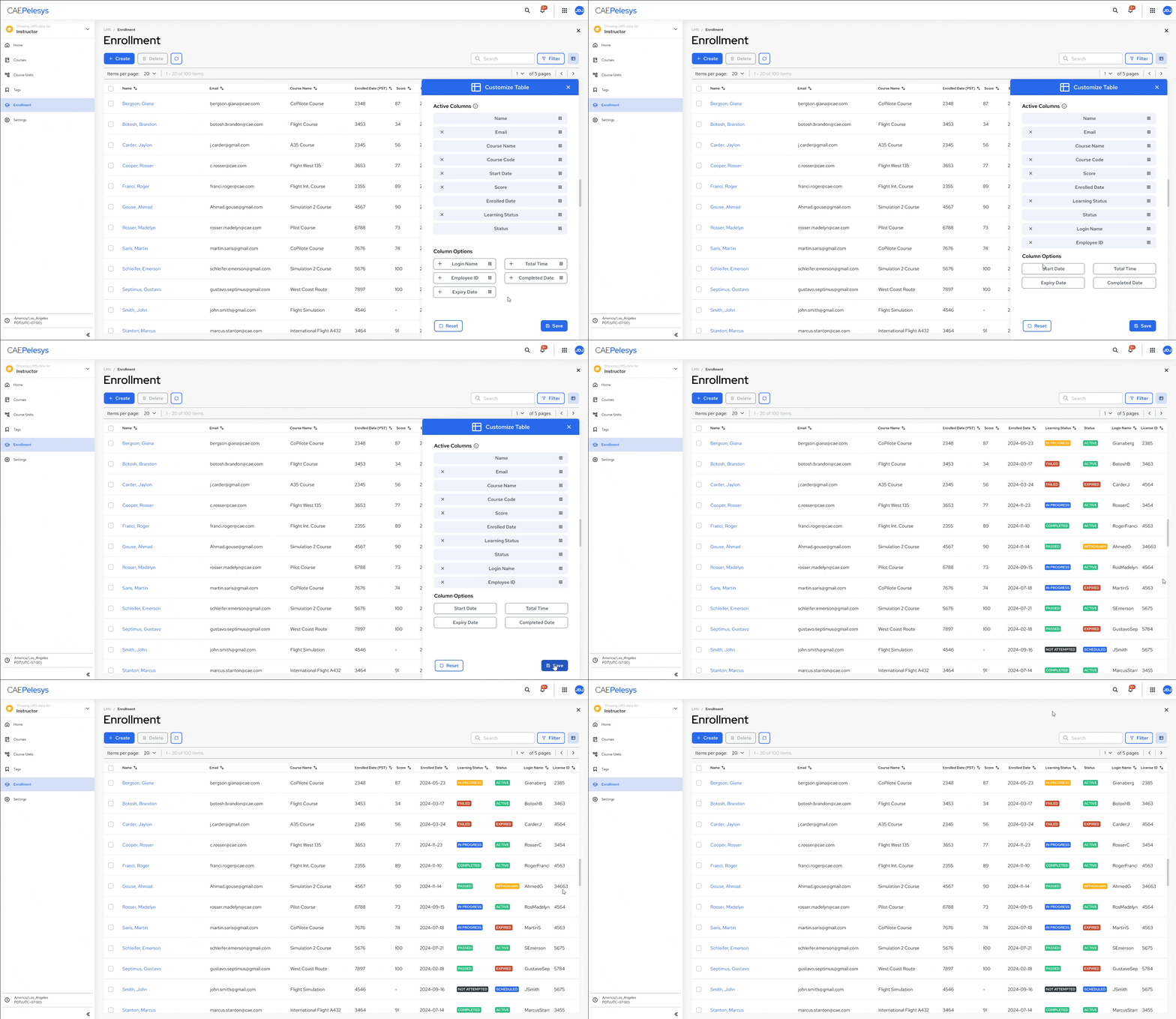
Instead of forcing a fixed set of columns, users can now select which columns they want to display.
This allows each user to tailor the table to their task, whether they are reviewing progress, compliance, or detailed training attributes.
Supporting column organization and prioritization
Users can reorder columns to control how information is presented.
This allows them to prioritize the most important data, making the table easier to scan and aligning it with how they review information.
Separating available data from visible data
The system distinguishes between all possible data fields and the subset currently visible in the table.
Users can move fields between these states, making it clear what is available versus what is actively being used. This reduces confusion and makes customization easier to understand.
Maintaining structure while enabling flexibility
While users can customize the table, the system maintains constraints to ensure consistency.
This prevents layouts from becoming unusable or overly fragmented, and ensures that the table remains readable regardless of how it is configured.
Outcome
The configurable table made the enrolment view more usable and scalable.
Users can now:
-
focus only on relevant data
-
reduce clutter in the interface
-
adapt the table to their specific workflow
At the same time, the system remains consistent and structured across different users and configurations.
The value of this work was not in adding customization.
It was in creating a system that balances flexibility with clarity, allowing large amounts of data to be managed in a way that supports different users without overwhelming them.